
如何在ISE中使用TCL文件?
先新建一个.txt文件,然后把后缀给为.tcl
写了几句简单代码
project new tcl_ise.xise; # 新建工程
project set family Virtex6; # 选择器件
project set device XC6VLX240T; # 选择型号
project set package FF1156; # 选择封装格式
project set speed -1; # 选择速度等级
但是运行tcl的时候出错
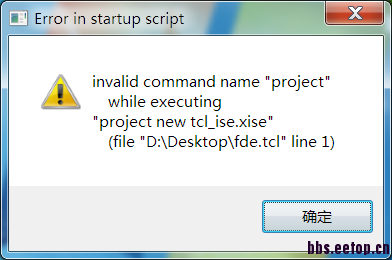
是不是我环境变量没设置好啊
应该在ISE自己的环境中使用tcl,而不是在Active那个环境下。里面的很多命令已经被ISE定制了,如project命令。
嗯嗯,明白了,多谢
ise支持tcl?看着像quartus的语法。
TCL console 或者accessory下面的命令行 范例D:\Xilinx\ug743\Tools>xtclsh xpartition.tcl data_synth.tcl
Overriding with data file data_synth.tcl
Synthesis tool is set to xst
**** Synthesizing Reconfig Module named <BramFirst> ****
xst -ifn BramFirst.xst
**** Synthesizing Reconfig Module named <BramSecond> ****
xst -ifn BramSecond.xst
**** Synthesizing Reconfig Module named <CountCW> ****
xst -ifn CountCW.xst
**** Synthesizing Reconfig Module named <CountCCW> ****
xst -ifn CountCCW.xst
**** Synthesizing Reconfig Module named <Top> ****
xst -ifn Top.xst
**** Finished bottom-up synthesis of all RMs ****
**** Generating XPartition file for Cfg_First_CW ****
**** Implementing Cfg_First_CW ****
Current time is: Thu May 14 14:09:21 中国标准时间 2015
Current time is: Thu May 14 14:09:21 中国标准时间 2015
**** Exporting ../Implementation/Cfg_First_CW to ../Implementation/XCfg_First_CW
****
**** Generating XPartition file for Cfg_Second_CCW ****
**** Implementing Cfg_Second_CCW ****
Current time is: Thu May 14 14:09:21 中国标准时间 2015
Current time is: Thu May 14 14:09:21 中国标准时间 2015
**** Exporting ../Implementation/Cfg_Second_CCW to ../Implementation/XCfg_Second
_CCW ****
**** Generating XPartition file for Cfg_Blank ****
**** Implementing Cfg_Blank ****
Current time is: Thu May 14 14:09:21 中国标准时间 2015
Current time is: Thu May 14 14:09:21 中国标准时间 2015
**** Exporting ../Implementation/Cfg_Blank to ../Implementation/XCfg_Blank ****
D:\Xilinx\ug743\Tools>