
S-para simulation Failed to converge in Momentum. need help!
Simulation / Synthesis Messages
Momentum MomEngine 7.0 (*) 2008.500 Jan 22 2008
Simulation Mode: RF
Substrate extension for RF mode
WARNING :
Failed to converge, continuing ...
Consequence : - database may not be accurate for frequencies
close to 0.00480202 GHz.
WARNING :
Failed to converge, continuing ...
Consequence : - database may not be accurate for frequencies
close to 0.00825947 GHz.
WARNING :
Failed to converge, continuing ...
Consequence : - database may not be accurate for frequencies
close to 0.0117169 GHz.
WARNING :
Failed to converge, continuing ...
Consequence : - database may not be accurate for frequencies
close to 0.0117169 GHz.
WARNING :
Failed to converge, continuing ...
Consequence : - database may not be accurate for frequencies
close to 0.0117169 GHz.
WARNING :
Failed to converge, continuing ...
Consequence : - database may not be accurate for frequencies
close to 0.0117169 GHz.
WARNING :
Failed to converge, continuing ...
Consequence : - database may not be accurate for frequencies
close to 0.0117169 GHz.
Status / Summary
------------ Momentum Simulation -----------------
Version: Momentum MomEngine 7.0 (*) 2008.500 Jan 22 2008
Simulation mode: RF
Design: transline
Simulation started on : Tue Dec 09 11:13:16 2008
Substrate calculation started
The simulation can not be conducted sucessfully. Does anybody can tell me how to resolve this problem. Thks.
Can you tell us what exactly you are simulating?
what frequency range? what inputs you gave to momentum simulator?
check,
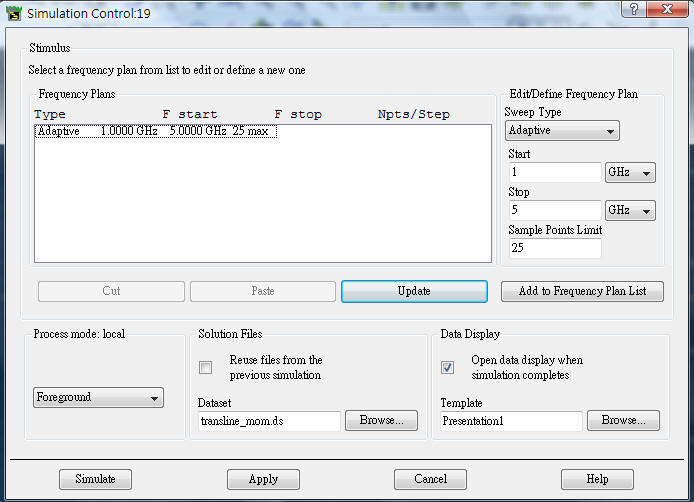
Have you defined frequency properly?
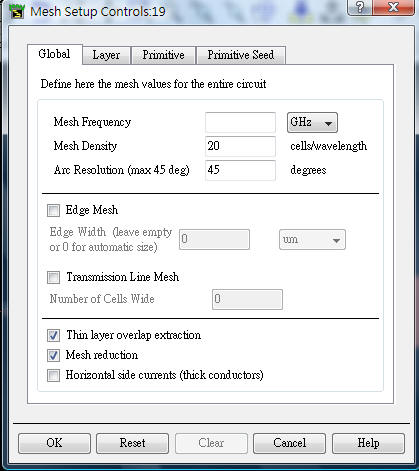
Have you defined mesh frequency properly?
Please share the project / design
Added after 22 minutes:
I too has the similar observation when i did the simulation for the range 500KHz to 2MHz
Thanks for your replies.
What I am simulating is just a simple transmission line.
The sweep freq is set to be from 1G to 5G.
I didn't give any input to the mom simulator.

The missing points are
1) mesh frequency set it to twice the required(5GH) resulting 10GHz.
2) check the EDGE mesh and transmission mesh.
Have you defined the substrate properties and defined the layer stack with conductor properties?
Hi wireless man
have you managed to solve your problem? what was the problem ? i am facing the same warning message
many thanks
1) you do not need to set the mesh frequency to twice the required frequency, leave it blank as it is
2) you should check the edge mesh box, but for this structure (Transmission line) since it is very simple you do not need to check the transmission line box. The accuracy of S parameters will get better very little but simulation time will increase drastically.
3) If you check the transmission line box, specify the number of cells wide, by checking edge mesh this number is already 3, so you have to increase it to say 4 or 5 or even higher.