ADS 2011.01 Port alternate ground referece
What I want to be able to do is place a PIN/PORT on a metal trace and then allow me to define the return or ground reference instead of letting the tool select this reference (not sure in the current version which return reference it chooses). So, simply define Port 1 on a metal trace on say TOP layer then select a metal structure on the TOP (electrically close), place a Pin/Port but make this a Ground reference and then associate the Port 1 to this ground reference.
I think your missing settings are in the EM setup document > ports.
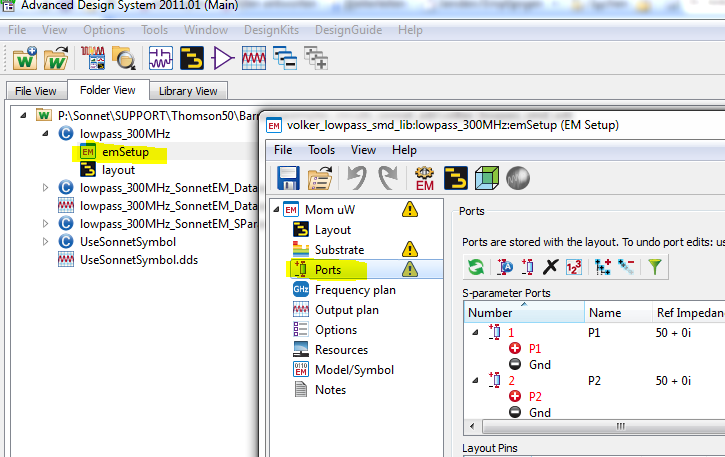
There is no option inside the EMSetup that allows one to define or associate ground reference ports (for that matter I do not see other ports just the IN/OUT and INPUTOUTPUT).
This has to be done within the layout tool in order to assign the correct return current reference relative to the signal port. I want to do this manually and there is no way to tell which negative reference metal momentum/ads is choosing and regardless I want to overwrite.
It is there, but not very intuitive.
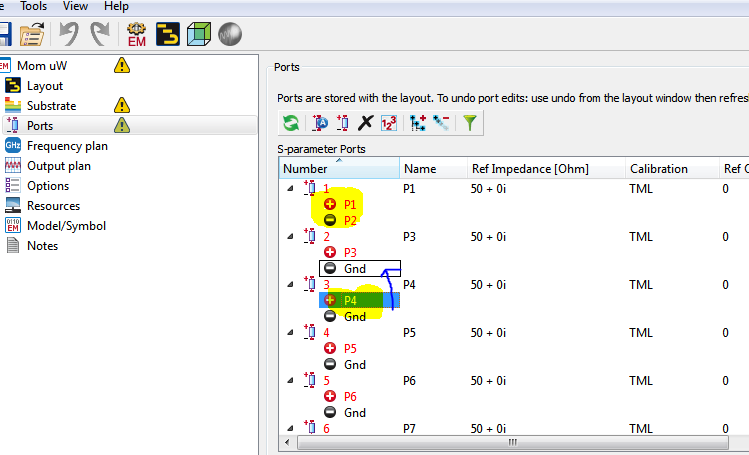
As described in the ADS help, you need to drag & drop the reference port onto the "Gnd" placeholder. Then, you will have P1 as signal and P2 as reference, for example. You can also change polarity from the right mouse button menu. See screenshot below.