
How to draw circular arc in ADS layout &design loop ante
时间:04-09
整理:3721RD
点击:
Is there anyone who knows how to draw circular arc in ADS layout ?
Do you guys have the project example of designing the loop antenna?
Rectrangular and circular loop antenna.
Set thew Entry Layer and grid as required.
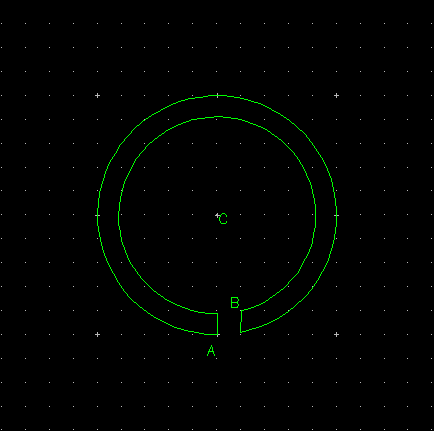
Insert a polygon starting at point A by selecting "Insert > Polygon" and click at pont A.
Then with the insert polygon command still running select "Insert > Arc (clockwise)". Click on the location of the centre of the arc, at point C and then move the mouse so that the arc is swept out to the required angle. When sufficient arc is drawn click that location.
Move to point B, to define the correct width, and left click to enter that location.
Now select "Insert > Arc (counter-clockwise)". Click the same location of the centre of the arc, at point C and then move the mouse so that the arc is swept out to the required angle. When sufficient arc is drawn click that location. This should be above point A.
Move the mouse to point A and double click to eneter the final segment an close the polygon.
This may take some experimentation to get the final shape required but these are the general steps.
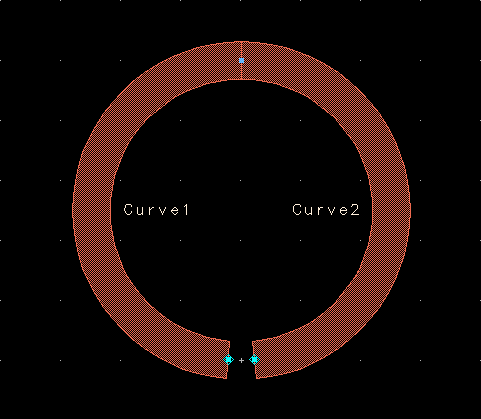
Alternatively place two MCURVE components with the required layer, width and angle (each angle < 180 degrees).
This can then be flattened and merged to create a single polygon if required.
Do you guys have the project example of designing the loop antenna?
Rectrangular and circular loop antenna.
Set thew Entry Layer and grid as required.
Insert a polygon starting at point A by selecting "Insert > Polygon" and click at pont A.
Then with the insert polygon command still running select "Insert > Arc (clockwise)". Click on the location of the centre of the arc, at point C and then move the mouse so that the arc is swept out to the required angle. When sufficient arc is drawn click that location.
Move to point B, to define the correct width, and left click to enter that location.
Now select "Insert > Arc (counter-clockwise)". Click the same location of the centre of the arc, at point C and then move the mouse so that the arc is swept out to the required angle. When sufficient arc is drawn click that location. This should be above point A.
Move the mouse to point A and double click to eneter the final segment an close the polygon.
This may take some experimentation to get the final shape required but these are the general steps.
Alternatively place two MCURVE components with the required layer, width and angle (each angle < 180 degrees).
This can then be flattened and merged to create a single polygon if required.