
Refreshing Display in Eagle
It should work in all time. Just close and reopen your design.
I have never had that problem. Ratsnest works fine for minimizing airwires when you move a component. It is possible that I/we do not understand the problem you are having.
Can you post a snippet or two showing the problem?
John
After more thought, are you trying to optimize airwires on a board that has a pour, without allowing the pour to happen?
1) If that is the case, a simple way is to delete the polygon for the pour. Of course, if it is a complicated polygon, that can lead to a lot of additional work.
2) You can use the command line to do a ratsnest only for the signal you have modified. Here is a simple example where there is a pour ("GND") and I have modified a signal ("VCC"). The command line is; ratsnest <signal_name>, for example, ratsnest VCC.
Here is the modified brd :
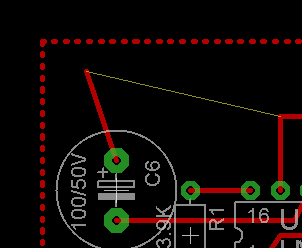
And here is the modified brd after executing, "ratsnest VCC"
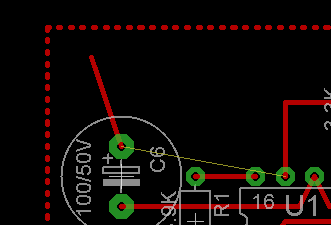
Note, the pour does not happen when using that command line, but the airwire is optimized.
If that is not your question, then please illustrate it as requested above.
John
john you understood what was my problem and you gave the answer what i expect thanks for that. airwires updated through command line without pouring, is there any other option to do same operation, by clicking icon?
There may be options I don't know. With a non-optimized airwire, as in the example, simply doing ratsnest without the command line should optimize it, but you also get the pour. So, you then right click the ripup tool near the polygon and select ripup group. That gets rid of the pour and leaves the polygon. Ratsnest does not operate like some other tools that allow you to directly right click on it to select a single item or group.
If you search help for "ratsnest," you will see that the command line allows use of wildcards, so you don't have to list individually every signal you want optimized. You may also want to read the section on making hidden airwires visible. I often hide a class of airwires (e.g, GND) to make routing signals easier. Then, when I am done doing that, I use the ratsnest command to make hidden airwires visible again.
Glad I could help.
John
Hi,
You can assign about any keyboard sequence to a function key.
Also you can generate your own buttons.
Klaus
you explained well. The mistake i did was, board contain board outline polygon defined in bottom layer, then i removed that polygon defined in bottom layer and i clicked ratsnest icon it works fine. if i want to update airwires when polygon defined in board then i should use command line as "ratsnest signal_name". i think i am going right...
If it is something you need to do often, then you may want to assign a key to it, such as Klaus suggested. The Assign dialog is in Options. I typically have ""Show" for my supplies set to various keys as this:
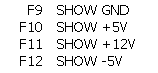
For a particular board, I may add other assigns.
John