
pads安装出现这个问题
请教该怎么修改
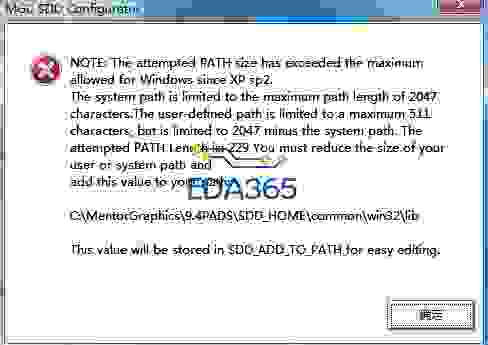

win7吗?安装完能用就好了,不用管这些
是安装不上,出现该对话框后自动完成,安装目录里面没有内容。图片上传后不清楚,明天重新上传。
出现错误图片文字是这样的
MGC SDD Configurator
NOTE: The attempted PATH size has exceeded the maximum
allowed for Windows since XP sp2.
The system path is limited to the maximum path length of 2047
characters.The user-defined path is limited to a maximum 511
characters, but is limited to 2047 minus the system path. The
attempted PATH Length is: 229 You must reduce the size of your
user or system path and
add this value to your path:
C:\MentorGraphics\9.4PADS\SDD_HOME\common\win32\lib
This value will be stored in SDD_ADD_TO_PATH for easy editing.
MGC SDD Configurator
An error occurred while setting MGC_HOME . Stopping the
Configurator.
The Configurator can be restarted by running
C:\M ento rG ra p h i cs\wi n 3 2\configurator.exe
现在电脑所有mentor 的软件都不能安装了,出现错误和这个一样,杯具啊。
我卸载干净 删除注册表 删除环境变量 删除安装盘目录文件
重新安装问题依旧。
The system path is limited to the maximum path length ,
“system path length ”这个值怎么修改呢?
希望大侠给给建议。
你和谐不对?
安装还没有安装上,软件自动中断了安装,还没有到和谐这一步的。坐等高手。
也同样遇到这个问题,请问是怎么解决的?谢谢。
将环境变量--用户变量中path不经常用的路径删掉,即可解决。
我试过了。还是不行,最好重新安装系统了,再次安装ok。
我试成功了!以前老是在50%处出上面的错,然后就无法继续安装了。反复几次,就是把无用的环境变量,尤其是所有SSD的所有MENTOR的全部删除,然后要重启。