
线路同步后,主控的PIN脚乱了?
同步时出现** ECO In Report **
Wed Jun 27 18:36:27 2012
Input File : C:\PADS Projects\eco2pcb.eco
Current Job : DR12-[X3]-20120525-1140.pcb
Line 1671 , Section *CHGPART*
Q6 TS\BJT-SOT-23 NPN
* Because the current design is in default layer mode and the decal is in increased layer mode, you cannot add decal "SOT-23". Open Layer Setup dialog box and change the layer mode of the design to increased layers.
Line 1673 , Section *CHGPART*
C1 TS\C0402 CAP_NP
* Because the current design is in default layer mode and the decal is in increased layer mode, you cannot add decal "0402C". Open Layer Setup dialog box and change the layer mode of the design to increased layers.
Line 1686 , Section *CHGPART*
C114 TS\C0402 CAP_C0402_0.1UF/16V/X5R/MRT_RS_2
* Because the current design is in default layer mode and the decal is in increased layer mode, you cannot add decal "C0603". Open Layer Setup dialog box and change the layer mode of the design to increased layers.
Line 1687 , Section *CHGPART*
C115 TS\C0402 CAP_C0603_TY_RS
* Because the current design is in default layer mode and the decal is in increased layer mode, you cannot add decal "C0603". Open Layer Setup dialog box and change the layer mode of the design to increased layers.
Line 1688 , Section *CHGPART*
C117 TS\C0402 CAP_NP
* Because the current design is in default layer mode and the decal is in increased layer mode, you cannot add decal "0402C". Open Layer Setup dialog box and change the layer mode of the design to increased layers.
Line 1689 , Section *CHGPART*
C118 TS\C0402 CAP_NP
* Because the current design is in default layer mode and the decal is in increased layer mode, you cannot add decal "0402C". Open Layer Setup dialog box and change the layer mode of the design to increased layers.
Line 1710 , Section *CHGPART*
C3 TS\C0402 CAP_NP
* Because the current design is in default layer mode and the decal is in increased layer mode, you cannot add decal "0402C". Open Layer Setup dialog box and change the layer mode of the design to increased layers.
Line 1714 , Section *CHGPART*
C4 TS\C0402 CAP_NP
* Because the current design is in default layer mode and the decal is in increased layer mode, you cannot add decal "0402C". Open Layer Setup dialog box and change the layer mode of the design to increased layers.
Line 1723 , Section *CHGPART*
C5 TS\C0402 CAP_NP
* Because the current design is in default layer mode and the decal is in increased layer mode, you cannot add decal "0402C". Open Layer Setup dialog box and change the layer mode of the design to increased layers.
Line 1736 , Section *CHGPART*
C7 TS\C0402 CAP_NP_7
* Because the current design is in default layer mode and the decal is in increased layer mode, you cannot add decal "C0402". Open Layer Setup dialog box and change the layer mode of the design to increased layers.
Line 1746 , Section *CHGPART*
C8 TS\C0402 CAP_NP_7
* Because the current design is in default layer mode and the decal is in increased layer mode, you cannot add decal "C0402". Open Layer Setup dialog box and change the layer mode of the design to increased layers.
Line 1748 , Section *CHGPART*
C83 TS\C0402 CAP_NP
* Because the current design is in default layer mode and the decal is in increased layer mode, you cannot add decal "0402C". Open Layer Setup dialog box and change the layer mode of the design to increased layers.
Line 1749 , Section *CHGPART*
C84 TS\C0402 CAP-POL_2
* Because the current design is in default layer mode and the decal is in increased layer mode, you cannot add decal "TS\EC-DIP20". Open Layer Setup dialog box and change the layer mode of the design to increased layers.
Line 1762 , Section *CHGPART*
C119 TS\C0603 CAP_TB_47UF/10V_NEC_RS
* Failed to get A-SIZE from library
Line 1766 , Section *CHGPART*
C14 TS\C0603 CAP_TB_47UF/10V_NEC_RS
* Failed to get A-SIZE from library
Line 1777 , Section *CHGPART*
C142 TS\C0805 CAP_NP
* Because the current design is in default layer mode and the decal is in increased layer mode, you cannot add decal "0402C". Open Layer Setup dialog box and change the layer mode of the design to increased layers.
Line 1789 , Section *CHGPART*
L2 TS\CM0805 CHOKE
* Because the current design is in default layer mode and the decal is in increased layer mode, you cannot add decal "L-SMD-4.4B". Open Layer Setup dialog box and change the layer mode of the design to increased layers.
Line 1790 , Section *CHGPART*
L3 TS\CM0805 CHOKE
* Because the current design is in default layer mode and the decal is in increased layer mode, you cannot add decal "L-SMD-4.4B". Open Layer Setup dialog box and change the layer mode of the design to increased layers.
Line 1795 , Section *CHGPART*
U8 TS\CSP3-68 LDO-3
* Failed to get TS\SOT-23 from library
Line 1797 , Section *CHGPART*
U3 TS\FBGA96 IC_STEPDOWN_S-8551_RS
* Because the current design is in default layer mode and the decal is in increased layer mode, you cannot add decal "SOT25". Open Layer Setup dialog box and change the layer mode of the design to increased layers.
Line 1805 , Section *CHGPART*
SW1 TS\MD-5 MD001-05003
* Because the current design is in default layer mode and the decal is in increased layer mode, you cannot add decal "TS\MD-5". Open Layer Setup dialog box and change the layer mode of the design to increased layers.
Line 1806 , Section *CHGPART*
SW2 TS\MD-5 MD001-05003
* Because the current design is in default layer mode and the decal is in increased layer mode, you cannot add decal "TS\MD-5". Open Layer Setup dialog box and change the layer mode of the design to increased layers.
Line 1807 , Section *CHGPART*
SW3 TS\MD-5 MD001-05003
* Because the current design is in default layer mode and the decal is in increased layer mode, you cannot add decal "TS\MD-5". Open Layer Setup dialog box and change the layer mode of the design to increased layers.
Line 1808 , Section *CHGPART*
SW4 TS\MD-5 MD001-05003
* Because the current design is in default layer mode and the decal is in increased layer mode, you cannot add decal "TS\MD-5". Open Layer Setup dialog box and change the layer mode of the design to increased layers.
Line 1809 , Section *CHGPART*
SW5 TS\MD-5 MD001-05003
* Because the current design is in default layer mode and the decal is in increased layer mode, you cannot add decal "TS\MD-5". Open Layer Setup dialog box and change the layer mode of the design to increased layers.
Line 1810 , Section *CHGPART*
Q1 TS\MOS-SOT-23 MF_P_IT2301B
* Because the current design is in default layer mode and the decal is in increased layer mode, you cannot add decal "SOT-23". Open Layer Setup dialog box and change the layer mode of the design to increased layers.
Line 1813 , Section *CHGPART*
R10 TS\R0402 RES
* Because the current design is in default layer mode and the decal is in increased layer mode, you cannot add decal "0402R". Open Layer Setup dialog box and change the layer mode of the design to increased layers.
Line 1830 , Section *CHGPART*
R13 TS\R0402 RES_0402_RS_2
* Because the current design is in default layer mode and the decal is in increased layer mode, you cannot add decal "R0603". Open Layer Setup dialog box and change the layer mode of the design to increased layers.
Line 1846 , Section *CHGPART*
R15 TS\R0402 RES_0603_RS_2
* Because the current design is in default layer mode and the decal is in increased layer mode, you cannot add decal "R0402". Open Layer Setup dialog box and change the layer mode of the design to increased layers.
Line 1885 , Section *CHGPART*
R2 TS\R0402 RES
* Because the current design is in default layer mode and the decal is in increased layer mode, you cannot add decal "0402R". Open Layer Setup dialog box and change the layer mode of the design to increased layers.
Line 1893 , Section *CHGPART*
R3 TS\R0402 RES
* Because the current design is in default layer mode and the decal is in increased layer mode, you cannot add decal "0402R". Open Layer Setup dialog box and change the layer mode of the design to increased layers.
Line 1895 , Section *CHGPART*
R4 TS\R0402 RES
* Because the current design is in default layer mode and the decal is in increased layer mode, you cannot add decal "0402R". Open Layer Setup dialog box and change the layer mode of the design to increased layers.
Line 1897 , Section *CHGPART*
R5 TS\R0402 RES
* Because the current design is in default layer mode and the decal is in increased layer mode, you cannot add decal "0402R". Open Layer Setup dialog box and change the layer mode of the design to increased layers.
Line 1902 , Section *CHGPART*
R6 TS\R0402 RES
* Because the current design is in default layer mode and the decal is in increased layer mode, you cannot add decal "0402R". Open Layer Setup dialog box and change the layer mode of the design to increased layers.
Line 1910 , Section *CHGPART*
R7 TS\R0402 RES
* Because the current design is in default layer mode and the decal is in increased layer mode, you cannot add decal "0402R". Open Layer Setup dialog box and change the layer mode of the design to increased layers.
Line 1920 , Section *CHGPART*
R8 TS\R0402 RES
* Because the current design is in default layer mode and the decal is in increased layer mode, you cannot add decal "0402R". Open Layer Setup dialog box and change the layer mode of the design to increased layers.
Line 1928 , Section *CHGPART*
R9 TS\R0402 RES
* Because the current design is in default layer mode and the decal is in increased layer mode, you cannot add decal "0402R". Open Layer Setup dialog box and change the layer mode of the design to increased layers.
Line 1953 , Section *CHGPART*
RT1 TS\R0603 PTC
* Failed to get from library
Line 1963 , Section *CHGPART*
U4 TS\SOP-8L RT9166
* Because the current design is in default layer mode and the decal is in increased layer mode, you cannot add decal "SOT-23". Open Layer Setup dialog box and change the layer mode of the design to increased layers.
Line 1968 , Section *CHGPART*
U1 TS\SPCA6330A IC_LDO_S-1135D33MC_SOT25
* Because the current design is in default layer mode and the decal is in increased layer mode, you cannot add decal "SOT25". Open Layer Setup dialog box and change the layer mode of the design to increased layers.
Line 2006 , Section *CHGPART*
D5 TS\TVS0603 BAT54C
* Because the current design is in default layer mode and the decal is in increased layer mode, you cannot add decal "SOT23". Open Layer Setup dialog box and change the layer mode of the design to increased layers.
Line 2010 , Section *CHGPART*
J6 TS\WAF-2-1.25P-DIP SD_0
* Because the current design is in default layer mode and the decal is in increased layer mode, you cannot add decal "TF1.1-1.6". Open Layer Setup dialog box and change the layer mode of the design to increased layers.
Line 2037 , Section *PART*
C12 CAP_C1206_10UF/16V/X5R/TY_RS
* Because the current design is in default layer mode and the decal is in increased layer mode, you cannot add decal "C0805". Open Layer Setup dialog box and change the layer mode of the design to increased layers.
Line 2038 , Section *PART*
C16 CAP_NP
* Because the current design is in default layer mode and the decal is in increased layer mode, you cannot add decal "0402C". Open Layer Setup dialog box and change the layer mode of the design to increased layers.
Line 2039 , Section *PART*
C6 CAP_NP
* Because the current design is in default layer mode and the decal is in increased layer mode, you cannot add decal "0402C". Open Layer Setup dialog box and change the layer mode of the design to increased layers.
Line 2040 , Section *PART*
C15 CAP_NP1
* Because the current design is in default layer mode and the decal is in increased layer mode, you cannot add decal "0805C". Open Layer Setup dialog box and change the layer mode of the design to increased layers.
Line 2041 , Section *PART*
J9 CON2
* Because the current design is in default layer mode and the decal is in increased layer mode, you cannot add decal "2PIN". Open Layer Setup dialog box and change the layer mode of the design to increased layers.
Line 2043 , Section *PART*
U17 IC_CHARGE_IT4054-4.2_RS
* Because the current design is in default layer mode and the decal is in increased layer mode, you cannot add decal "SOT25". Open Layer Setup dialog box and change the layer mode of the design to increased layers.
Line 2044 , Section *PART*
U2 IC_STEPDOWN_S-8551_RS
* Because the current design is in default layer mode and the decal is in increased layer mode, you cannot add decal "SOT25". Open Layer Setup dialog box and change the layer mode of the design to increased layers.
Line 2047 , Section *PART*
LED1 LED_KPT1608SURCK-5MA_RED_RS
* Because the current design is in default layer mode and the decal is in increased layer mode, you cannot add decal "LED". Open Layer Setup dialog box and change the layer mode of the design to increased layers.
Line 2048 , Section *PART*
Q15 NPN
* Because the current design is in default layer mode and the decal is in increased layer mode, you cannot add decal "SOT-23". Open Layer Setup dialog box and change the layer mode of the design to increased layers.
Line 2049 , Section *PART*
R281 R
* Because the current design is in default layer mode and the decal is in increased layer mode, you cannot add decal "R0402". Open Layer Setup dialog box and change the layer mode of the design to increased layers.
Line 2050 , Section *PART*
R1 RES
* Because the current design is in default layer mode and the decal is in increased layer mode, you cannot add decal "0402R". Open Layer Setup dialog box and change the layer mode of the design to increased layers.
Line 2113 , Section *PART*
R12 RES_0402_RS_2
* Because the current design is in default layer mode and the decal is in increased layer mode, you cannot add decal "R0603". Open Layer Setup dialog box and change the layer mode of the design to increased layers.
Line 2114 , Section *PART*
R14 RES_0603_RS_2
* Because the current design is in default layer mode and the decal is in increased layer mode, you cannot add decal "R0402". Open Layer Setup dialog box and change the layer mode of the design to increased layers.
Line 2115 , Section *PART*
R280 R_2
* Because the current design is in default layer mode and the decal is in increased layer mode, you cannot add decal "R0402". Open Layer Setup dialog box and change the layer mode of the design to increased layers.
Line 2118 , Section *PART*
SW7 SW-PUSHBUTTON-3
* Failed to get TS\PTCFG-T-RB from library
Line 2119 , Section *PART*
SW6 SW_PUSHBUTTON_3
* Failed to get from library
Line 2174 , Section *NET*
R4.1 C3.1 R3.2 U2.5
* Part name U2 not found
Line 2176 , Section *NET*
R7.1 C6.1 R6.2 U3.5
* Part name C6 not found
* Not valid pin name 5 for part U3
Line 2178 , Section *NET*
C1.2 U1.4
* Not valid pin name 4 for part U1
Line 2180 , Section *NET*
R14.1 LED1.1
* Part name R14 not found
* Part name LED1 not found
Line 2182 , Section *NET*
U17.1 LED1.2
* Part name U17 not found
* Part name LED1 not found
Line 2184 , Section *NET*
R12.2 D5.3
* Part name R12 not found
* Not valid pin name 3 for part D5
Line 2186 , Section *NET*
U3.1 C117.2 R10.2
* Not valid pin name 1 for part U3
Line 2188 , Section *NET*
U2.1 C118.2 R2.2
* Part name U2 not found
Line 2190 , Section *NET*
C142.2 R1.2 U1.3
* Part name R1 not found
* Not valid pin name 3 for part U1
Line 2192 , Section *NET*
R12.1 Q1.1 R13.2
* Part name R12 not found
* Not valid pin name 1 for part Q1
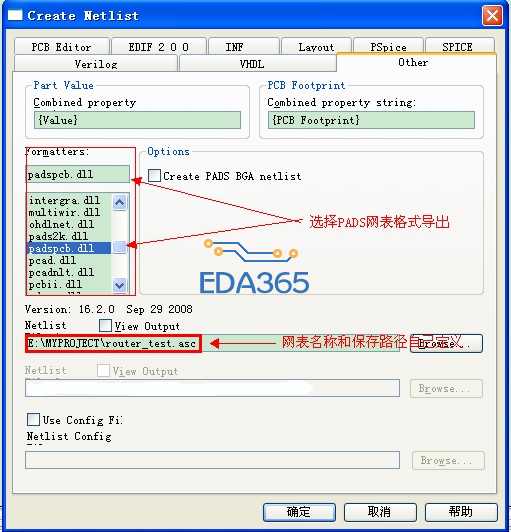
首先,orcad可以直接导出PADS格式的网表,然后新建工程,导入网表并另存为新名称,然后再进行ECO对比!
具体怎么操作呢?
首先切换到工程管理窗口,单击“tools”菜单,选择“Create Netlist...”选项,在弹出的对话框下,执行如下操作:
剩下的PADS的ECO对比升级,在此不赘述。你可查看相关PADS帮助文档。
PADS网表导出
有没有更详细的说明?这个看了还是不太明白。