
哪位仁兄使用过PADS2007.2中DX配合PADS Layout来画PCB?
多谢~~
在DX中怎样添加库?
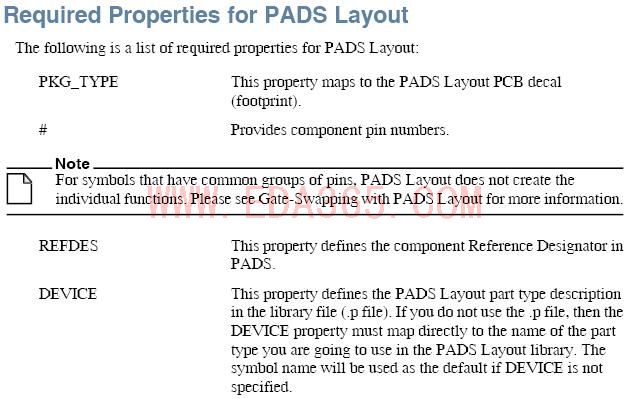
DX的symbol怎样跟PADS Layout的封装怎样才能对应起来?
没有人这样用过么?
To add libraries:
1. From the menu, click Setup > Settings > Symbol Libraries (section). The Symbol
Libraries window opens.
2. Click the Add icon . The Library dialog box opens
3. Browse to the symbol library you want to add. This library can be located in the
SymbolLibs partition of your Central Library, or anywhere on you network where it is
accessible to your system.
4. Click OK.
Result: The library is added to the list. Library entries are color-coded as follows:
• Read-0nly libraries are white.
• Writeable libraries are green.
• Mega libraries are Blue
Note: Mega libraries are store in a proprietary, compiled format. DxDesigner
decompiles the libraries automatically before displaying them in the Symbols
window.
haohaohaohao