
灌铜时出现如下提示,怎么改?
时间:10-02
整理:3721RD
点击:
如题:
Drilled pads with Nondrilled pads with
less than 50% thermal extensions less than 50% thermal extensions
Report of Thermal Spokes Generator.
On Bottom:
C151.2 (-121.23, 6795.7) # = 1
U38.3 (657.87, 6853.54) # = 0
C35.2 (1812.02, 3747.48) # = 1
U8.13 (2640, 4440.77) # = 1
U35.36 (308.35, 5110.45) # = 1
U27.9 (1126.28, 4996.87) # = 0
C114.2 (-511.46, 2505.14) # = 0
虽然知道这个没什么太大影响, 但我没遇到过,请教各位大虾,是我哪里设置的不够?
谢谢!
Drilled pads with Nondrilled pads with
less than 50% thermal extensions less than 50% thermal extensions
Report of Thermal Spokes Generator.
On Bottom:
C151.2 (-121.23, 6795.7) # = 1
U38.3 (657.87, 6853.54) # = 0
C35.2 (1812.02, 3747.48) # = 1
U8.13 (2640, 4440.77) # = 1
U35.36 (308.35, 5110.45) # = 1
U27.9 (1126.28, 4996.87) # = 0
C114.2 (-511.46, 2505.14) # = 0
虽然知道这个没什么太大影响, 但我没遇到过,请教各位大虾,是我哪里设置的不够?
谢谢!
那些器件的管脚(GND网络)的没有打过孔。
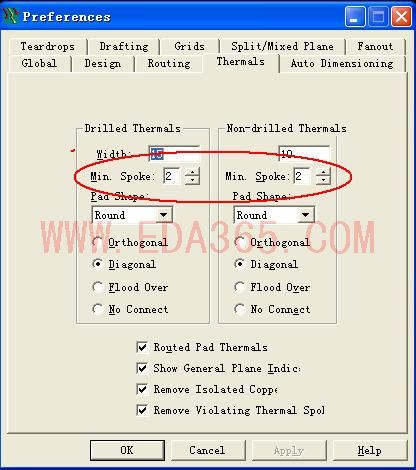
试试把min Spoke的数量降低;
是形成花焊盘的意思。不打紧。
谁的正确呢?嘿嘿,不清楚
都正确、但是多做板没有什么影响
Tools->Options->thermals,全部换成Flood Over
没有什么影响的
7楼对