
Help to check a 2.4-GHz printed dipole antenna
时间:04-08
整理:3721RD
点击:
Hi!everyboy,
I design a 2.4-GHz printed dipole antenna with the IE3D. This antenna just has a metal plane on one layer of the FR4 board as shown in figure 1. After simulating
S-parameters with the IE3D, the s11 seems has error because of the values are larger than 0 dB as shown in figure2. I set up the port type is advanced extension(+1,-1) but I doubt if the port type is not suitable for this design. So could everyone help me to check this question!
*The length of the dipole antenna in one side is equal to 24 mm, and the width of it is equal to 3 mm.
Figure 1 2.4-GHz printed dipole antenna
Figure 2 s11
I design a 2.4-GHz printed dipole antenna with the IE3D. This antenna just has a metal plane on one layer of the FR4 board as shown in figure 1. After simulating
S-parameters with the IE3D, the s11 seems has error because of the values are larger than 0 dB as shown in figure2. I set up the port type is advanced extension(+1,-1) but I doubt if the port type is not suitable for this design. So could everyone help me to check this question!
*The length of the dipole antenna in one side is equal to 24 mm, and the width of it is equal to 3 mm.
Figure 1 2.4-GHz printed dipole antenna
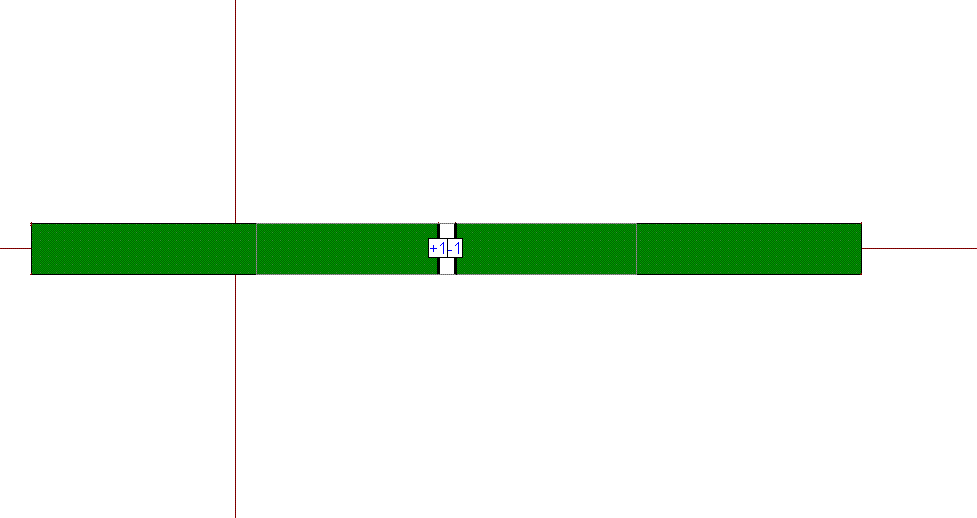
Figure 2 s11
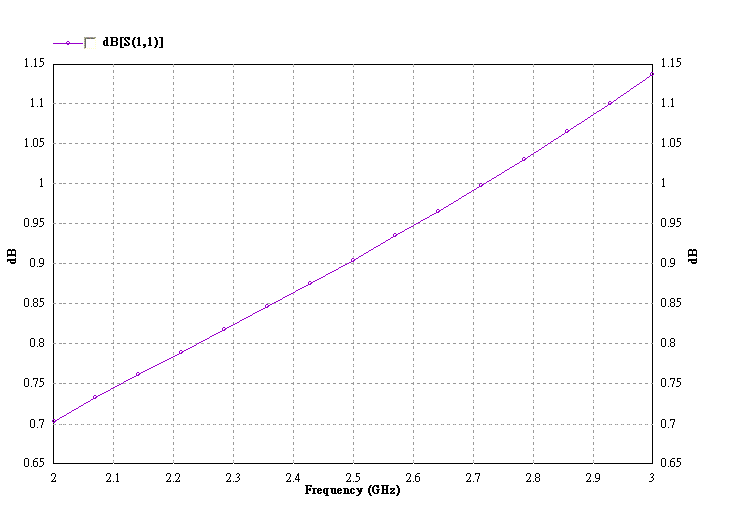
Here you use advanced extension port type and you could see the extension of each port overlap with each other, which may cause the previous problem.
You could use horizontal localized port type for printed dipole antenna here. Please refer to IE3D manual to learn how to use horizontal localized port.
Alternatively, you could also add additional strips on the balanced excitation ends and use advanced extension port (+1,-1).