DTS的I2C设备注册不上,不跑probe函数(MTKandroid6.0系统)
时间:10-02
整理:3721RD
点击:
......................................
注册I2C驱动程序
ret = i2c_add_driver(&MMA9555_i2c_driver);
if (ret != 0) {
printk("[%s] failed to register MMA9555 i2c driver.\n", __func__);
return ret;
} else {
printk("[%s] Success to register MMA9555 i2c driver.\n", __func__); //返回成功 log,但是MMA9555_i2c_driver里面的.probe函数没跑,
}
......................................................................
.................................................................
下面的红色字体probe函数不跑,驱动文件
#define MMA9555_I2C_NAME "mma9555_sensor_i2c"
static const struct i2c_device_id MMA9555_i2c_id[] = {
{ MMA9555_I2C_NAME, 0 },
{ }
};
#ifdef CONFIG_OF
static const struct of_device_id MMA9555_i2c_of_mach[] = {
{.compatible = "mediatek,mma9555_sensor_i2c"},
{},
};
#endif
static struct i2c_driver MMA9555_i2c_driver = {
.driver = {
.name = MMA9555_I2C_NAME,
.owner = THIS_MODULE,
#ifdef CONFIG_OF
.of_match_table = MMA9555_i2c_of_mach,
#endif
},
.probe = MMA9555_i2c_probe,
.remove = MMA9555_i2c_remove,
.id_table = MMA9555_i2c_id,
};
................................................................
下面是dts文件
***.dts
&i2c2 {
alsps@48 {
compatible = "mediatek,alsps_stk3x1x";
reg = <0x48>;
status = "okay";
};
mma9555_sensor_i2c@0x98 {
compatible = "mediatek,mma9555_sensor_i2c";
reg = <0x98>;
status = "okay";
};
};
注册I2C驱动程序
ret = i2c_add_driver(&MMA9555_i2c_driver);
if (ret != 0) {
printk("[%s] failed to register MMA9555 i2c driver.\n", __func__);
return ret;
} else {
printk("[%s] Success to register MMA9555 i2c driver.\n", __func__); //返回成功 log,但是MMA9555_i2c_driver里面的.probe函数没跑,
}
......................................................................
.................................................................
下面的红色字体probe函数不跑,驱动文件
#define MMA9555_I2C_NAME "mma9555_sensor_i2c"
static const struct i2c_device_id MMA9555_i2c_id[] = {
{ MMA9555_I2C_NAME, 0 },
{ }
};
#ifdef CONFIG_OF
static const struct of_device_id MMA9555_i2c_of_mach[] = {
{.compatible = "mediatek,mma9555_sensor_i2c"},
{},
};
#endif
static struct i2c_driver MMA9555_i2c_driver = {
.driver = {
.name = MMA9555_I2C_NAME,
.owner = THIS_MODULE,
#ifdef CONFIG_OF
.of_match_table = MMA9555_i2c_of_mach,
#endif
},
.probe = MMA9555_i2c_probe,
.remove = MMA9555_i2c_remove,
.id_table = MMA9555_i2c_id,
};
................................................................
下面是dts文件
***.dts
&i2c2 {
alsps@48 {
compatible = "mediatek,alsps_stk3x1x";
reg = <0x48>;
status = "okay";
};
mma9555_sensor_i2c@0x98 {
compatible = "mediatek,mma9555_sensor_i2c";
reg = <0x98>;
status = "okay";
};
};
我也遇到过这样的问题,可以尝试把name改成跟文件名一样。
qiezi
怎么解决的啊?
name改成跟文件名一样? 是改哪里?麻烦解释下。我的dts的 name和 驱动的名字如上面贴出来的。
小编,您的问题解决了没有呢?
我的MT6735 ,Android 5.1系统,问题跟你的一样一样,probe无法被调用。
如果您解决了,麻烦告知,谢谢。
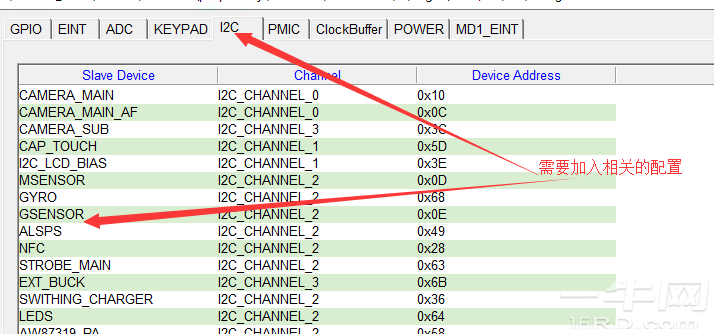
问题出来了还得有个结尾才好,刚好我这边也出现了同样的问题,后面调试发现我们除了dts文件配置节点外,codegen.dws文件中I2C的配置也是需要加入的,这样才能跑下去。C:\Users\Administrator\Pictures\123.png
前面图片没传上去,再传一下
codegen.dws