
AGPS Supl Profile Configration
时间:10-02
整理:3721RD
点击:
[DESCRIPTION]
How to change Agps supl server default profile——How to change
default supl profile
How to add AGPS supl server profile——How to add supl profile
How to adaptive change AGPS supl server profile along with SIM
card——How to adaptive change supl profile
[SOLUTION]
1.How to change default supl profile
In agps_profiles_conf2.xml,the default profile is google, whose format is:
<cur_supl_profile name="GOOGLE"
addr="supl.google.com"
port="7275"
tls="true"
/>
cur_supl_profile is refer to default profile. If we need change the default profile, we should change it as below:
<cur_supl_profile name="nexteldata"
addr="supl.iusacell.com"
port="7275"
tls="true"
/>
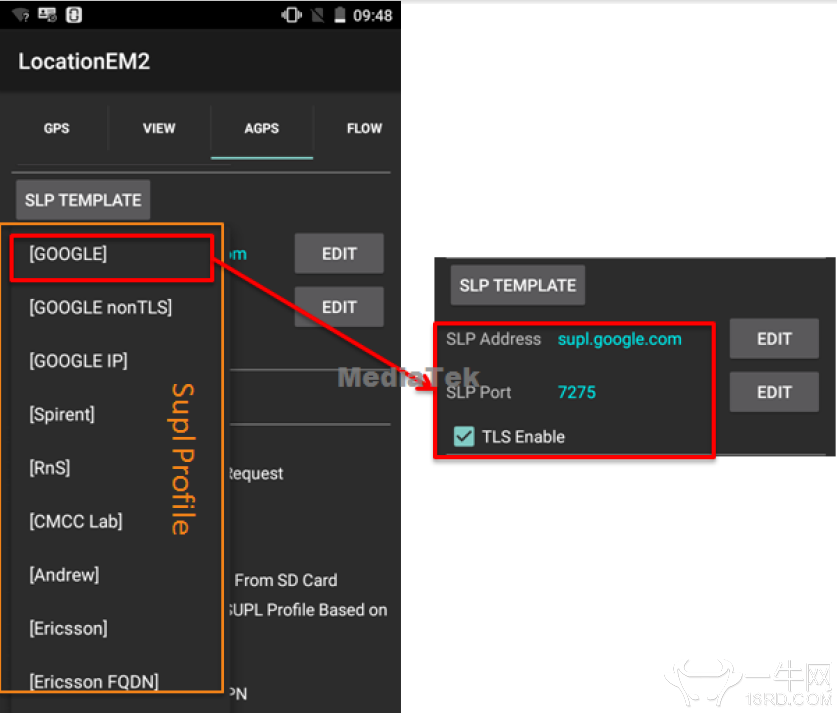
Now the default profile will be changed to nexteldata, which can be seen in SLP Template.
2.How to add supl profile
If we want to add supl profile in agps_profiles_conf2.xml, we only need to add supl_profile, according to google’s format as
below:
<!-- GOOGLE-->
<supl_profile name="GOOGLE"
addr="supl.google.com"
port="7275"
tls="true"
/>
<!-- nexteldata-->
<supl_profile name="nexteldata"
addr=" supl.iusacell.com "
port="7275"
tls="true"
/>
<!-- IUSACELL-->
<supl_profile name="IUSACELL"
addr="supl.iusacell.com"
port="7275"
tls="true"
/>
Now the nexteldata and IUSACELL are added to the SLP Template.
3.How to adaptive change supl profile
If we want to adaptive change supl profile along with SIM card, we should ensure auto_profile_enable=“true” in
agps_profiles_conf2.xml , then add operator MCC and MNC in profile as below:
<!-- GOOGLE-->
<supl_profile name="GOOGLE"
addr="supl.google.com"
port="7275"
tls="true"
/>
<!-- nexteldata-->
<supl_profile name="nexteldata"
addr="supl.iusacell.com"
port="7275"
tls="true“
mcc_mnc="334050"
/>
<!-- IUSACELL-->
<supl_profile name="IUSACELL"
addr="supl.iusacell.com"
port="7275"
tls="true“
mcc_mnc="334090"
/>
Now if the inserted SIM card is mcc(334) mnc(050), the SLP Template will auto select nexteldata, else if the inserted SIM card is
mcc(334) mnc(090), the SLP Template will auto select IUSACELL.
How to change Agps supl server default profile——How to change
default supl profile
How to add AGPS supl server profile——How to add supl profile
How to adaptive change AGPS supl server profile along with SIM
card——How to adaptive change supl profile
[SOLUTION]
1.How to change default supl profile
In agps_profiles_conf2.xml,the default profile is google, whose format is:
<cur_supl_profile name="GOOGLE"
addr="supl.google.com"
port="7275"
tls="true"
/>
cur_supl_profile is refer to default profile. If we need change the default profile, we should change it as below:
<cur_supl_profile name="nexteldata"
addr="supl.iusacell.com"
port="7275"
tls="true"
/>
Now the default profile will be changed to nexteldata, which can be seen in SLP Template.
2.How to add supl profile
If we want to add supl profile in agps_profiles_conf2.xml, we only need to add supl_profile, according to google’s format as
below:
<!-- GOOGLE-->
<supl_profile name="GOOGLE"
addr="supl.google.com"
port="7275"
tls="true"
/>
<!-- nexteldata-->
<supl_profile name="nexteldata"
addr=" supl.iusacell.com "
port="7275"
tls="true"
/>
<!-- IUSACELL-->
<supl_profile name="IUSACELL"
addr="supl.iusacell.com"
port="7275"
tls="true"
/>
Now the nexteldata and IUSACELL are added to the SLP Template.
3.How to adaptive change supl profile
If we want to adaptive change supl profile along with SIM card, we should ensure auto_profile_enable=“true” in
agps_profiles_conf2.xml , then add operator MCC and MNC in profile as below:
<!-- GOOGLE-->
<supl_profile name="GOOGLE"
addr="supl.google.com"
port="7275"
tls="true"
/>
<!-- nexteldata-->
<supl_profile name="nexteldata"
addr="supl.iusacell.com"
port="7275"
tls="true“
mcc_mnc="334050"
/>
<!-- IUSACELL-->
<supl_profile name="IUSACELL"
addr="supl.iusacell.com"
port="7275"
tls="true“
mcc_mnc="334090"
/>
Now if the inserted SIM card is mcc(334) mnc(050), the SLP Template will auto select nexteldata, else if the inserted SIM card is
mcc(334) mnc(090), the SLP Template will auto select IUSACELL.
签到专用组