
关于MENTOR软件安装的 问题
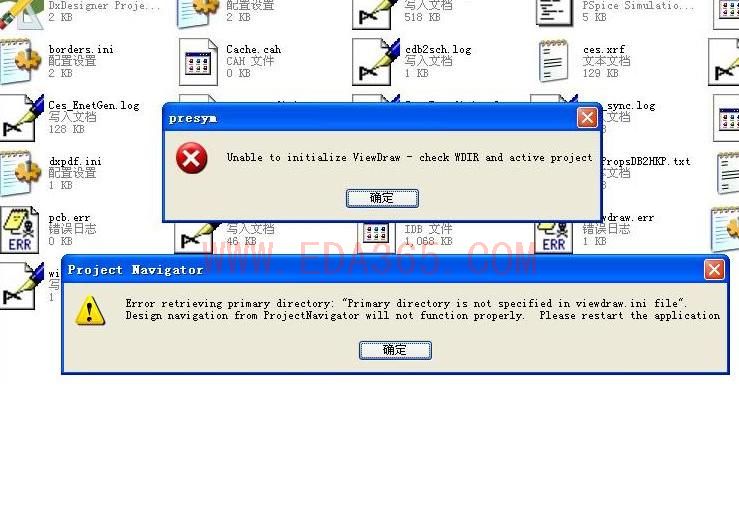
file:///L:/678.JPG 大家好,我的MENTOR安装好了以后,再每次打开原理图的时候都会出现这个错误,然后原理图就打不开,这个是什么原因呢,弄了好几天了,都不知道什么原因,大家帮忙看看,谢谢大家,这个到底是什么地方设置的不对的还是怎么了,都重现安装了无数次了
file:///L:/678.JPG
图片上的字是:unable to initialize viewdraw - check WDIR and active project
第二章图的字是:error retrieving primary directory:"primary directory is not spectfied in viewdraw.ini file" Design navigation from projectnavigator will not function properly.please restart the application.
都安装了好多次了,都是这样
看一下viewdraw.ini这个文件,用记事本打开,最后面几行是有关中心库的路径,改改就行,你可以粘上来我给你看看。
| Viewdraw initialization file for ePD Version 2005
|
| (c) Copyright 2005 Mentor Graphics Corporation
||
|
| Set the default display characteristics for each object
|
|
| Colors
| ------------------------------------------------------------------
|
| 0 Black | 4 Red | 8 Gray | 12 Lt. Red
| 1 Blue | 5 Magenta | 9 Lt. Blue | 13 Lt. Magenta
| 2 Green | 6 Brown | 10 Lt. Green | 14 Yellow
| 3 Cyan | 7 Lt. Gray | 11 Lt. Cyan | 15 White
|
|
| Fillstyles:
| ------------------------------------------------------------------
|
| 0 Hollow | 1 Solid
|
|
| Object Color Fillstyle Linestyle
| or Font
| ------ ----- --------- ---------
|
NET 12 1 0
COMPONENT 15 0 0
ATTRIBUTE 14 0 0
LABEL 15 0 0
PIN 3 0 0
BOX 2 0 0
LINE 2 0 0
CIRCLE 2 0 0
ARC 2 0 0
TEXT 10 0 0
|
|
| set the display characteristics for the selection layer
|
SELECTION_LAYER 15 0 0
|
| set the display characteristics for the border layer
|
BORDER_LAYER 15 0 0
|
| set the display characteristics for the value layer
|
VALUE_LAYER 7 0 0
|
| set the display characteristics for the annotation layer
|
ANNO_LAYER 7 0 0
|
| set the background color
|
|5.0 WINDOW_BACKGROUND 0 0 0
|
|
| Default values
|
GRID 10 | Grid spacing (units)
DOTSIZE 5 | Solder dot radius (units)
BUS_DOTSIZE 12 | Bus solder dot radius (units)
BOXSIZE 5 | Dangling joint box width (units)
TEXTSIZE 10 | Text size (units)
TEXTORIGIN 3 | Text origin
BUSWIDTH 4 | Bus half-width (units)
BUBBLESIZE 5 | Bubble size on pins (units)
AUTOLOG 10 | Autolog value (number of Viewdraw commands to
| hold before writing to log file)
SDISTANCE 10 | Selection distance (units)
ADISTANCE 20 | Avoidance distance (units)
SHEETSIZE 1 | Sheet size.
| 0 = ASIZE, 1 = BSIZE, 2 = CSIZE, 3 = DSIZE,
| 4 = ESIZE, 5 = A4, 6 = A3, 7 = A2,
| 8 = A1, 9 = A0
| 10 = ZSIZE (requires width and height)
| Ex: SHEETSIZE 10 200 200
ROUTE 2 | Net routing.
| 0 = Straight, 1 = Orthogonal, 2 = Avoidance
SCOPE 0 | Scope for labels 0 = Local, 1 = Global
TEXT_THRESHOLD 3 | Threshold (units)
NEW_ATTR_VIS 1 | New attribute and value visibility
| 1 = Name and value visible,
| 2 = Name only visible
| 3 = Value only visible
BLOCKTYPE 0 | Default block type
| 0 = Composite, 1 = Module, 2 = annotate, 3 = pin
UNDO 16 | number of commands to undo
|
| Default modes. (1 = On or Yes; 0 = Off or No.)
|
GRIDON 1 | Grid display.
BORDERON 1 | Border display.
HEADERON 1 | Header display.
COMPTEXTON 1 | Component text, labels and attributes.
TEXTON 1 | Text.
ATTRON 1 | Attributes
LABELON 1 | labels
DETAIL 1 | detail ** Changed at 5.0 **
SNAPTOPIN 1 | snap to pin
UNIQUE_LABEL 0 | create unique labels on copy
VALUESON 1 | display simulation values (or generic b/a)
CONTEXT_WINDOW 0 | display context window ** Changed at 5.0 **
NAMESON 0 | display internal names
SORTON 1 | alphabetically sort dialog entries
PNUMSON 1 | display pin numbers
RNUMSON 1 | display refdes
DEFSHEET 0 | search for sheet template for new sheets
XTRAERRS 1 | print out all errors in checker
DBOXON 0 | pick names from dialog boxes
STROKES 1 | executing commands using strokes
DYNAMIC_PANNING 1 | moving with dynamic panning
|
| Turning this on will enable case preservation for attribute values. This
| may sound interesting, but it can raise havoc with downstream tools, as
| well as with older tools that don't supprt mixed-case.
|
PRESERVE_CASE 1 | turn on case preservation
|
| This is an example of how to add an attribute to the mixed case list. In
| this example, any attribute named DATASHEET would be allowed to have a
| mixed-case value.
|
ALLOW_VALUE_MIXED #
|5.0 DB_ERR_VERBOSE 1 | verbose database reader error messages
|5.0 FUBPINTYPEON 1 | create PINTYPE att as FUB pins created
|5.0 SELNAMEON 0 | display selected object's name in LL
NETNAME VDD | Upon creation, VDD will have global scope.
NETNAME GND | Upon creation, GND will have global scope.
|SYMBOL_QUALIFIERS \D | Demorgan
|SYMBOL_QUALIFIERS \C | Conventional
|SYMBOL_QUALIFIERS \A | Ansi
|SYMBOL_QUALIFIERS \P | Package
ATTR_RESET SS#1 | Never copy this SCICARD attribute
ATTR_RESET SS#2 | Never copy this SCICARD attribute
ATTR_RESET ALL_ID | Never copy this ALLEGRO attribute
ATTR_RESET GEN_ID | Never copy this ALLEGRO attribute
ATTR_RESET DIFF_PAIR | Never copy the DIFF_PAIR attribute
ATTR_RESET REFDES SYMBOL_VALUE | Reset REFDES attribute value from symbol
|8.0 SHOW_TOOLTIP_FOR REFDES
|8.0 COMPONENT_TOOLTIPS 1
|5.0 COARSE_GRID 0
|5.0 DYNAMIC_XY 0
|5.0 BEGIN_NETS_IN_SPACE 0
|5.0 OATS 1
|5.0 ATTR_PROMOTE BIT
|7.5 PARTIAL_UNLIMITED_TEXT_LENGTH 1
|8.0 IO_PINS builtin:in.1
|8.0 IO_PINS builtinut.1
|8.0 IO_PINS builtin:bi.1
|8.0 ONSHEET_PINS builtinnsheet.1
|8.0 OFFSHEET_PINS builtinffsheet.1
|8.0 POWER_PINS builtin:pwr.1
|8.0 GROUND_PINS builtin:gnd.1
|8.1 SERIES_RESISTOR_SYM analog:res.1
|8.1 PARALLEL_RESISTOR_SYM analog:res.2
|8.1 CAPACITOR_SYM analog:cap.1
|8.1 GROUND_SYM builtin:gnd.1
|8.1 POWER_SYM builtin:pwr.1
| Design Directories
| ------------------
|
| Format: DIR [DirType(s)] DirPath (LibName)
|
| DirType: p or pw - primary / writable
| w - writable (read/write)
| r - read-only
| m or rm - read-only megafile
|
| DirPath: directory specification ("." for current directory relative path)
|
| LibName: library name aka library alias or VHDL library name (optional)
| 32 characters or less. Must begin with a letter.
|
| examples:
|
| DIR [p] .
| DIR [r] /libs/74ls (vl74ls)
| DIR [r] /libs/builtin (builtin)
| DIR [w] ./under/development/alu (newalu)
|
DIR [p] .
帮忙看看
还有,这个文件MENTOR安装程序中好多地方都有,是需要那个里面的这个软件呢
怎么没有人回答呢
我也是刚学的加我QQ576620568
最后一行改成DIR [pw] . 试试
viewdraw.ini是原理图工程下的那个。