
基于NIOS II的uC/OS系统的开发
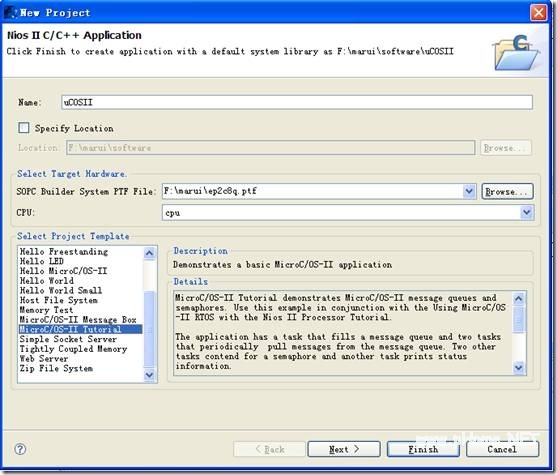
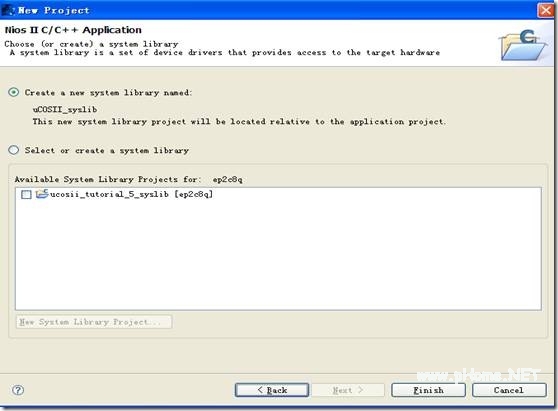
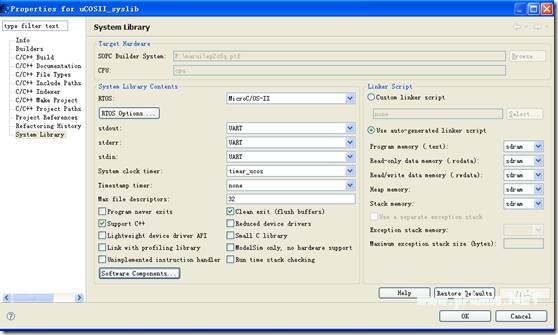
到EPCS中。至此Quart II工程工作完毕.。 拉下来对Nios工程进行设置。如果没有关闭SOPC界面,可点击“System Generation”下的Nios ii IDE按钮即可进行Nios工程,前提是安装了Nios ii 软件。 新建一个Nios II工程,单击“File”菜单下“New”下的“Nios II C/C++ Application”如下图。 进入后出现如下图,并按图中参数设置(注ucosII为工程名,ep2c8q为SOPC系统,Micro uC/OS-II tutorial为uCOS-II模板)。 单击Next按钮后按下图设置后单击Finish。 接下来对工程进行基本的设置,右击uCOSII选择弹出菜单中的“System Library Properties”出现如下界面并按照如下参数设置。然后单击OK。 把ucosii_tutorial.c中文件内容用下面代码代替。 ? 1 2 3 4 5 6 7 8 9 10 11 12 13 14 15 16 17 18 19 20 21 22 23 24 25 26 27 28 29 30 31 32 33 34 35 36 37 38 39 40 41 42 43 44 45 46 47 48 49 50 51 52 53 54 55 56 57 58 59 60 61 62 63 64 65 66 67 68 69 70 71 72 73 74 75 76 77 78 79 80 81 82 83 84 85 86 87 88 89 90 91 92 93 94 95 96 97 98 99 100 101 102 103 104 105 106 107 108 109 110 111 112 113 114 115 116 117 118 119 120 121 122 123 124 125 126 127 128 129 130 131 132 133 134 135 136 137 138 139 140 141 142 143 144 145 146 147 148 149 150 151 152 153 154 155 156 157 158 159 160 161 162 163 164 165 166 167 168 169 170 171 172 173 174 175 176 177 178 179 180 181 182 183 184 185 186 187 188 189 190 191 192 193 194 195 196 197 198 199 200 201 202 203 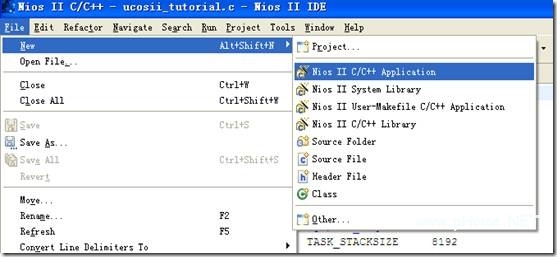
/** =====================================================================================** Filename: ds1302.c** Description: DS1302驱动** Version: 1.0.0* Created: 2010.4.16* Revision: none* Compiler: Nios II 9.0 IDE** Author: 马瑞 (AVIC)* Email: avic633@gmail.com** =====================================================================================*/#include stdio.h>#include unistd.h>#include string.h>#include includes.h#include alt_ucosii_simple_error_check.h#includeds1302.h#include altera_avalon_pio_regs.h#include altera_avalon_timer_regs.h#include alt_types.h#include sys/alt_irq.h//定义椎栈#define TASK_STACKSIZE 2048OS_STK initialize_task_stk[TASK_STACKSIZE];OS_STK ds1302_task_stk[TASK_STACKSIZE];OS_STK led_task_stk[TASK_STACKSIZE];OS_STK seg_task_stk[TASK_STACKSIZE];//定义优先级#define INITIALIZE_TASK_PRIORITY 6#define LED_TASK_PRIORITY 10#define DS1302_TASK_PRIORITY 11#define SEG_TASK_PRIORITY 12//格式为: 秒 分 时 日 月 星期 年unsignedchartime[7] = {0x00,0x19,0x14,0x17,0x03,0x17,0x10};unsignedcharti[][7]={一,二,三,四,五,六,日};alt_u8 segtab[10]={0xc0,0xf9,0xa4,0xb0,0x99,0x92,0x82,0xf8,0x80,0x90};unsignedcharbittab[6]={0xfe,0xfd,0xfb,0xf7,0xef,0xdf};unsignedcharled_buffer[8]={1,2,3,4,5,6,7,8};staticunsignedcharcnt=0;voidseg_handler(void);/** === FUNCTION ======================================================================* Name: ds1302_task* Description: 任务1 调用ds1302驱动并通过串口显示数据* =====================================================================================*/voidds1302_task(void* pdata){INT8U return_code = OS_NO_ERR;ds1302.set_time(time);printf(Hello from Nios II!\n);while(1){printf(Hello from Nios II!\r\n);ds1302.get_time(time);printf(%02d-%02d-%02d %02d:%02d:%02d 星期%s\r\n,time[6],time[4],time[3],time[2],time[1],time[0],ti[time[5]-1]);OSTimeDlyHMSM(0, 0, 1, 0);}}/** === FUNCTION ======================================================================* Name: led_task* Description: 任务2 调用LED驱动并通过串口显示数据* =====================================================================================*/voidled_task(void* pdata){INT8U return_code = OS_NO_ERR;unsignedintnum=0;LED->DATA =0xffffffff;while(1){printf(led is running!\r\n);if(num%2==0)LED->DATA =0xffffffff;elseLED->DATA =0;num++;OSTimeDlyHMSM(0, 0, 2, 0);
- Windows CE 进程、线程和内存管理(11-09)
- RedHatLinux新手入门教程(5)(11-12)
- uClinux介绍(11-09)
- openwebmailV1.60安装教学(11-12)
- Linux嵌入式系统开发平台选型探讨(11-09)
- Windows CE 进程、线程和内存管理(二)(11-09)