
移植VB维护程序到mobile下
= IO.Ports.Parity.None
Case e
m_SerialPort.Parity = IO.Ports.Parity.Even
Case E
m_SerialPort.Parity = IO.Ports.Parity.Even
Case o
m_SerialPort.Parity = IO.Ports.Parity.Odd
Case O
m_SerialPort.Parity = IO.Ports.Parity.Odd
End Select
m_SerialPort.DataBits = DataBits
Select Case StopBits
Case 0
m_SerialPort.StopBits = IO.Ports.StopBits.None
Case 1
m_SerialPort.StopBits = IO.Ports.StopBits.One
Case 2
m_SerialPort.StopBits = IO.Ports.StopBits.Two
End Select
Select Case ComType
Case 0
m_SerialPort.Handshake = IO.Ports.Handshake.None
Case 1
m_SerialPort.Handshake = IO.Ports.Handshake.RequestToSend
Case 2
m_SerialPort.Handshake = IO.Ports.Handshake.RequestToSendXOnXOff
Case 3
m_SerialPort.Handshake = IO.Ports.Handshake.XOnXOff
End Select
m_SerialPort.PortName = COM + CStr(ComPort)
m_SerialPort.ReadTimeout = 500
m_SerialPort.WriteTimeout = 500
If m_SerialPort.IsOpen = True Then
m_SerialPort.Close()
End If
m_SerialPort.Open()
If m_SerialPort.IsOpen = True Then
bRxStatus = COMOK
ReDim bDate(2)
ReadData(bDate)
bRxLock = False
readThread.Start()
Else
bRxStatus = COMERROR
End If
' readThread.Join()
End Sub
Public Function ComStatus() As Byte
ComStatus = bRxStatus
End Function
Function ReadData(ByRef bDate() As Byte) As Integer
Dim bLen As Integer
bLen = m_SerialPort.BytesToRead
If bLen > 0 Then
ReDim bDate(bLen)
m_SerialPort.Read(bDate, 0, bLen)
ReadData = bLen
Else
ReadData = 0
End If
bRxStatus = COMFREE
End Function
Public Function SendDate(ByVal bDateBuff() As Byte, ByVal iLen As Integer) As Boolean
If bRxLock = False Then
m_SerialPort.Write(bDateBuff, 0, iLen)
bRxLock = True
bRxStatus = READLOCK
SendDate = True
Else
SendDate = False
End If
End Function
Public Shared Sub Read()
While (1)
Thread.Sleep(50)
Try
If m_SerialPort.BytesToRead > iRxLen Then
iRxLen = m_SerialPort.BytesToRead
iRxTime = 0
bRxStatus = READLOCK
Else
If iRxLen > 0 Then
'收到数据
bRxStatus = READOK
bRxLock = False
Else
iRxTime = iRxTime + 1
If iRxTime > 10 Then
bRxStatus = READOUTTIME
End If
bRxLock = False
End If
End If
Catch ex As TimeoutException
' Do nothing
End Try
End While
End Sub
Public Sub Close()
readThread.Abort()
m_SerialPort.Close()
End Sub
End Class
定义窗口变量
Dim ComPort As New RS232TXClass
启动后调用
ComPort.Init(9600,n,8,1, 0, 1)
在主窗口中,通过一个定时器事件,查看串口情况
Private Sub Timer1_Tick(ByVal sender As System.Object, ByVal e As System.EventArgs) Handles Timer1.Tick
Dim bDate() As Byte
Dim iLen As Integer
ReDim bDate(2)
If ComPort.ComStatus = 2 Then
iLen = ComPort.ReadData(bDate)
If iLen > 2 Then
ShowRevDate(bDate, iLen)
End If
End If
End Sub
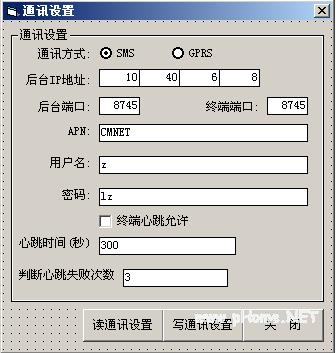
下面实现一个windows的路灯维护程序移植到windows CE上面去的一些简单示例。
这是原来VB上面的一个界面。
这个是我移植到VB.net for Mobile的版本,因为在Mobile上面多窗口切换很麻烦,就作成分页的显示了。
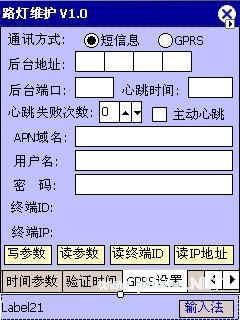
需要注意的是,因为Mobile上面的输入法启动后会遮盖一部分窗口,为了输入方面最后把需要输入的地方放到上面去,以免影响输入。这里我把两个显示性Label放到了后面。
VB.NET的绘图和VB不是很一样,更加接近C++的绘图方式,但是只要不一些概念弄清楚,你会发现这种绘图方式使用更加方便,更加方便你对于GDI+的理解。
VB.NET中可以使用 Dim bm As New Bitmap(238, 214) 直接建立一个位图,然后把绘制好的位图覆盖回去。
绘制文字的时候,需要字体和画刷,象下面这样:
ShowTextBrush = New SolidBrush(Color.Blue)
mFont = New Font(FontFamily.GenericSansSerif, 8, FontStyle.Regular)
g.DrawString(HELLO, mFont, ShowTextBrush, 12, 82)
绘制线的时候,需要画笔。
Pen1 = New Pen(Color.Red)
g.DrawLine(Pen1, OldX, OldY, NewX, NewY)
填充图形的时候,需要画刷
tempbrush = New SolidBrush(Color.FromArgb(192, 192, 255))
g.FillRectangle(tempbrush, 0, 0, 238, 214)
绘制扇形和弧形,VB.NET没有提供,但是我从网上找到了实现方法,用联系线和连续填充实现弧形和棒图的绘制。函数如下
'=============================
- Windows CE 进程、线程和内存管理(11-09)
- RedHatLinux新手入门教程(5)(11-12)
- uClinux介绍(11-09)
- openwebmailV1.60安装教学(11-12)
- Linux嵌入式系统开发平台选型探讨(11-09)
- Windows CE 进程、线程和内存管理(二)(11-09)