
SmartScope - 重塑示波器
Compatibility - Cross Platform
We're proud to announce that the SmartScope is the world's first instrument to work on iOS, Android, Windows, Linux and OSX! This true cross-platform-compatibility was achieved by choosing for the Xamarin framework from the very beginning of UI development. As a result, the SmartScope works on virtually all PCs, laptops, tablets and smartphones.
Graphical User Interface
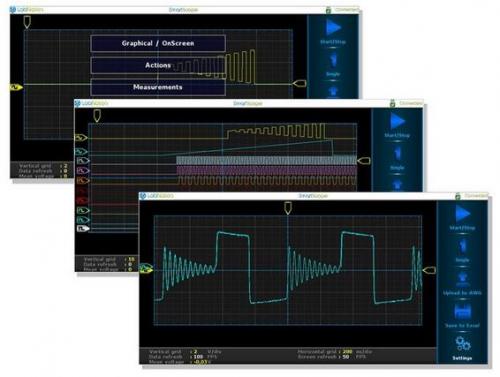
On all existing USB oscilloscopes, the software clearly has been an afterthought. Not so for the SmartScope! While competitors try to imitate traditional scopes by literally demanding the user to rotate knobs with a mouse, the SmartScope reinvents the way we will operate oscilloscopes: by making full use of the touchscreen!
The PC software is identical to the mobile version. With intuitive operations (scroll to zoom or simply drag a rectangle, dragging to reposition) and innovative features (window pops to foreground on trigger) it's our mission to continually provide you with the software you need to aid your projects.
Why is the cost so low?
It's LabNation's vision to open up the market of professional electronics measurement equipment to everyone. At $179 we believe there's no one out there offering a comparable scope. If you add the AWG, logic analyzer capabilities, intuitive software AND pioneering Android/iOS support, it is clear that the price could have been far higher.
By giving everyone access to a quality development and debugging instrument, we hope to contribute to the increasing speed at which amazing projects are making the transition from ideas to prototypes!
Will the SmartScope work on my smartphone/tablet?
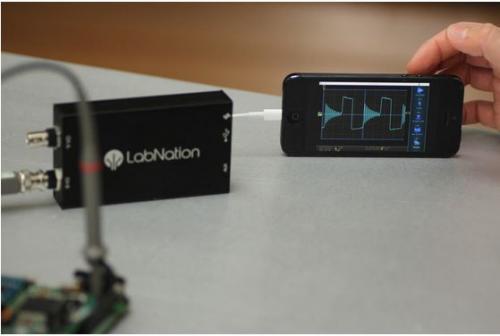
The SmartScope is the world's first instrument targeting compatibility with both iOS and Android. Although the required functionality (USB-OTG) is becoming a standard for Android devices the past few years, we were not able to get cooperation from Apple (yet ;). As such, our team set out to start from jailbroken iOS devices, and hack our way to the USB controller, which we eventually succeeded in. However, this means the SmartScope will only be recognized in case you apply a jailbreak patch to your iOS smartphone (which is a free, legal software operation that takes 10 minutes of your time).
On Android, USB-OTG is supported since Android v3.1, however it depends on the age and quality of your phone whether USB-OTG was implemented correctly. There are sitesdescribing how to check for USB-OTG functionality, in case you want to be sure.
More specifically:
• Windows: driver available for XP, Win7, Win8
• OSX: supported, no driver needed (uses generic USB driver)
• Linux: supported, no driver needed (uses generic USB driver)
• Android: tested and verified on $52 Q88 tablet, Sony Xperia Z. More will be tested soon, but no problems expected as phones/tablets either support USB openly or not.
• iOS: requires 5-minute legal software jailbreak patch. Tested and verified on iPad1, iPad2, iPhone 5, iPhone 5S. Will not work on iPhones 1,2,3 as they simply don't have a USB chip.
Power/Sync port
The Power/Sync port is nothing more than a microUSB port, whose purpose is twofold:
• In case your tablet/smartphone is running low on battery, you can power the SmartScope through this port. This can be done using any standard microUSB charger cable.
• More advanced, we have foreseen the possibility to connect multiple SmartScopes together. In such case, synchronisation between the different SmartScopes is essential. This can be achieved easily by connecting both devices through their Power/Sync port using the cable provided in the 4-channel reward package.
SmartScope 示波器 FPGA 开源仪器 相关文章:
- 新型便携式泰克示波器方便了电子工程师(08-23)
- Tektronix推出数字储存示波器,频宽达200MHz (08-24)
- 安捷伦推出的Infiniium 8000 系列示波器(08-23)
- 用示波器测量确定性抖动(08-25)
- 如何用函数信号发生器产生低占空比的信号(08-23)
- 抖动测量三种方法(08-25)