
第十六篇?rico board的uboot添加自定义命令iled,完成点灯操作。
时间:10-02
整理:3721RD
点击:
参考common/cmd_gpio.c文件,完成了uboot下简单的点灯操作,开始准备控制ricoboard上的4个状态灯,发现不能控制,后来就尝试了别的引脚在GPIO0_2上面,实验成功了。在uboot的根目录common下新建文件cmd_iled.c。代码如下:
重新上电运行uboot如下:

led效果:


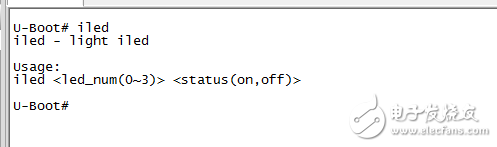
还可以查看下iled命令帮助内容:
- /*
- * Control GPIO pins on the fly
- *
- * Copyright (c) 2008-2011 Analog Devices Inc.
- *
- * Licensed under the GPL-2 or later.
- */
- #include
- #include
- #include
- #ifndef name_to_gpio
- #define name_to_gpio(name) simple_strtoul(name, NULL, 10)
- #endif
- ulong led_num[4] = {
- 2,
- 3,
- 14,
- 15,
- };
- static int do_iled(cmd_tbl_t *cmdtp, int flag, int argc, char * const argv[])
- {
- int num, status = 1;
- const char *str_num, *str_status;
- if (argc != 3)
- show_usage:
- return CMD_RET_USAGE;
- str_num = argv[1];
- str_status = argv[2];
- num = name_to_gpio(str_num);
- if (num \n"
- );
重新上电运行uboot如下:
led效果:
还可以查看下iled命令帮助内容: