
linux系统下环境搭建之制作sd卡分区
时间:10-02
整理:3721RD
点击:
这边分享一下linux环境下制作sd卡分区的步骤:
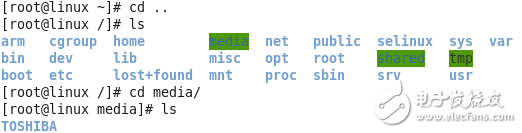
1、把sd卡插入PC,我们可以在media下看到sd卡,如图
2、卸载sd卡 [root@localhost ~]#umount /media/TOSHIBA
3、使用fdisk查看sd卡的信息 # fdisk -l
-----------------------------------------------------
Disk /dev/sdb: 15.5 GB, 15476981760 bytes
255 heads, 63 sectors/track, 1881 cylinders
Units = cylinders of 16065 * 512 = 8225280 bytes
Sector size (logical/physical): 512 bytes / 512 bytes
I/O size (minimum/optimal): 512 bytes / 512 bytes
Disk identifier: 0x00000000
Device Boot Start End Blocks Id System
/dev/sdb1 2 1881 15101100 c W95 FAT32 (LBA)
------------------------------------------------------------
4、删除sd卡的所有分区 //对于分区有两种命令 fdisk 和 parted
[root@localhost ~]# fdisk /dev/sd //TAB补齐的效果
sda sda1 sda2 sda3 sdb sdb1 ////这里用的是之前写过的sd卡
[512bytes|bootloader-|----fat32--rom----]
sdb1是fat32那边的
实际操作应为
[root@localhost ~]# fdisk /dev/sdb
Command (m for help): m
Command action
a toggle a bootable flag
b edit bsd disklabel
c toggle the dos compatibility flag
d delete a partition
l list known partition types
m print this menu
n add a new partition
o create a new empty DOS partition table
p print the partition table
q quit without saving changes
s create a new empty Sun disklabel
t change a partition's system id
u change display/entry units
v verify the partition table
w write table to disk and exit
x extra functionality (experts only)
Command (m for help): p
Disk /dev/sdb: 15.5 GB, 15476981760 bytes
255 heads, 63 sectors/track, 1881 cylinders
Units = cylinders of 16065 * 512 = 8225280 bytes
Sector size (logical/physical): 512 bytes / 512 bytes
I/O size (minimum/optimal): 512 bytes / 512 bytes
Disk identifier: 0x00000000
Device Boot Start End Blocks Id System
/dev/sdb1 2 1881 15101100 c W95 FAT32 (LBA)
Command (m for help): d
Selected partition 1
Command (m for help): p
Disk /dev/sdb: 15.5 GB, 15476981760 bytes
255 heads, 63 sectors/track, 1881 cylinders
Units = cylinders of 16065 * 512 = 8225280 bytes
Sector size (logical/physical): 512 bytes / 512 bytes
I/O size (minimum/optimal): 512 bytes / 512 bytes
Disk identifier: 0x00000000
Device Boot Start End Blocks Id System
5、新建一个分区,在分区前面留百/千分1给Supperboot (100M)
Command (m for help): n
Command action
e extended
p primary partition (1-4)
p
Partition number (1-4): 1
First cylinder (1-1881, default 1): 2
Last cylinder, +cylinders or +size{K,M,G} (2-1881, default 1881):
Using default value 1881
6、修改分区的system id
Command (m for help): t
Selected partition 1
Hex code (type L to list codes): b
Changed system type of partition 1 to b (W95 FAT32)
Command (m for help): p
Disk /dev/sdb: 15.5 GB, 15476981760 bytes
255 heads, 63 sectors/track, 1881 cylinders
Units = cylinders of 16065 * 512 = 8225280 bytes
Sector size (logical/physical): 512 bytes / 512 bytes
I/O size (minimum/optimal): 512 bytes / 512 bytes
Disk identifier: 0x00000000
Device Boot Start End Blocks Id System
/dev/sdb1 2 1881 15101100 b W95 FAT32
Command (m for help): w 保存
The partition table has been altered!
7、格式化分区
[root@localhost ~]# mkfs.vfat -F 32 /dev/sdb1
mkfs.vfat 3.0.9 (31 Jan 2010)
[格式化只能格式化分区而不能格式化设备,所以时/dev/sdb1 ]
sync
mkfs.vfat -F 32 /dev/sdb1 -n linjie //改名字
8、把Supperboot.bin烧写到sd卡
[root@localhost images]# writeboot Superboot.bin /dev/sdb
start ....
end ....
1、把sd卡插入PC,我们可以在media下看到sd卡,如图
2、卸载sd卡 [root@localhost ~]#umount /media/TOSHIBA
3、使用fdisk查看sd卡的信息 # fdisk -l
-----------------------------------------------------
Disk /dev/sdb: 15.5 GB, 15476981760 bytes
255 heads, 63 sectors/track, 1881 cylinders
Units = cylinders of 16065 * 512 = 8225280 bytes
Sector size (logical/physical): 512 bytes / 512 bytes
I/O size (minimum/optimal): 512 bytes / 512 bytes
Disk identifier: 0x00000000
Device Boot Start End Blocks Id System
/dev/sdb1 2 1881 15101100 c W95 FAT32 (LBA)
------------------------------------------------------------
4、删除sd卡的所有分区 //对于分区有两种命令 fdisk 和 parted
[root@localhost ~]# fdisk /dev/sd //TAB补齐的效果
sda sda1 sda2 sda3 sdb sdb1 ////这里用的是之前写过的sd卡
[512bytes|bootloader-|----fat32--rom----]
sdb1是fat32那边的
实际操作应为
[root@localhost ~]# fdisk /dev/sdb
Command (m for help): m
Command action
a toggle a bootable flag
b edit bsd disklabel
c toggle the dos compatibility flag
d delete a partition
l list known partition types
m print this menu
n add a new partition
o create a new empty DOS partition table
p print the partition table
q quit without saving changes
s create a new empty Sun disklabel
t change a partition's system id
u change display/entry units
v verify the partition table
w write table to disk and exit
x extra functionality (experts only)
Command (m for help): p
Disk /dev/sdb: 15.5 GB, 15476981760 bytes
255 heads, 63 sectors/track, 1881 cylinders
Units = cylinders of 16065 * 512 = 8225280 bytes
Sector size (logical/physical): 512 bytes / 512 bytes
I/O size (minimum/optimal): 512 bytes / 512 bytes
Disk identifier: 0x00000000
Device Boot Start End Blocks Id System
/dev/sdb1 2 1881 15101100 c W95 FAT32 (LBA)
Command (m for help): d
Selected partition 1
Command (m for help): p
Disk /dev/sdb: 15.5 GB, 15476981760 bytes
255 heads, 63 sectors/track, 1881 cylinders
Units = cylinders of 16065 * 512 = 8225280 bytes
Sector size (logical/physical): 512 bytes / 512 bytes
I/O size (minimum/optimal): 512 bytes / 512 bytes
Disk identifier: 0x00000000
Device Boot Start End Blocks Id System
5、新建一个分区,在分区前面留百/千分1给Supperboot (100M)
Command (m for help): n
Command action
e extended
p primary partition (1-4)
p
Partition number (1-4): 1
First cylinder (1-1881, default 1): 2
Last cylinder, +cylinders or +size{K,M,G} (2-1881, default 1881):
Using default value 1881
6、修改分区的system id
Command (m for help): t
Selected partition 1
Hex code (type L to list codes): b
Changed system type of partition 1 to b (W95 FAT32)
Command (m for help): p
Disk /dev/sdb: 15.5 GB, 15476981760 bytes
255 heads, 63 sectors/track, 1881 cylinders
Units = cylinders of 16065 * 512 = 8225280 bytes
Sector size (logical/physical): 512 bytes / 512 bytes
I/O size (minimum/optimal): 512 bytes / 512 bytes
Disk identifier: 0x00000000
Device Boot Start End Blocks Id System
/dev/sdb1 2 1881 15101100 b W95 FAT32
Command (m for help): w 保存
The partition table has been altered!
7、格式化分区
[root@localhost ~]# mkfs.vfat -F 32 /dev/sdb1
mkfs.vfat 3.0.9 (31 Jan 2010)
[格式化只能格式化分区而不能格式化设备,所以时/dev/sdb1 ]
sync
mkfs.vfat -F 32 /dev/sdb1 -n linjie //改名字
8、把Supperboot.bin烧写到sd卡
[root@localhost images]# writeboot Superboot.bin /dev/sdb
start ....
end ....
每次都碎图....每次都传不好
第二行的图
好